
10. Clustering, mini-qmail, QMQ, and Tapping
In this chapter some ideas are laid out how to setup s/qmail for larger sites and high mail volumes (> 100,000 mails/day). Distinguished domain specific settings given the hosting of serveral domains and clustering is also discussed.
Finally, the optional 'tapping' feature of s/qmail is introduced, since this might be a legal requirement.
- Bird's View on Clustering
- The Concept of Mini-qmail
- The Idea of Qmail-Multiple-Queues (QMQ)
- Controlling domain-specific Delivery and Email Tapping
10.1. Bird's View on Clustering
The main and single-instance setup of s/qmail is given in the 'big picture':
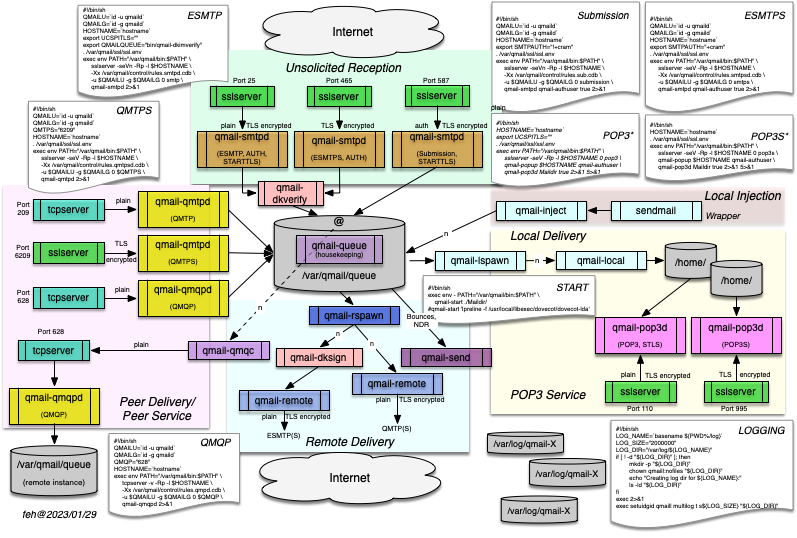
Here, several 'mini-qmail' Internet receiving instance of qmail can be setup while on is particular instance is in place to be responsible and to queue the ingress (incoming) and outgress (outgoing) email traffic. This setup might not be optimal for large sites:
- It might be required to provide load balancing for the ingress traffic.
- SMTP mail is based on MX records providing distances as given by the weight and provisioned in the DNS which results in usable MTA redundancy.
- In case a user is compromised and acts as a spam bot - and the MTA's IP address is blacklisted.
- Perhaps, we need to separate usual user mail traffic from email compaigns with high volume on different machines to enable faster thruput.
- Serving multiple hosted domains may require different virus filters and spam detection.
- Delivery to the downstream MTAs, which receive the incoming mails, may become degraded and a large queue slows down our MTA.
- Incoming spam compaigns, currently not treated appropriately, while their mails filling up the queue, needs to be treated 'specially'.
- For particular legal or security reasons, some (ingress and/or outgress) mails shall be forwarded to a particular address for inspection.
A multi-tier architecture is needed to overcome those shortcomings and is available now at your fingertips.
10.2. The Concept of mini-qmail
Daniel J. Bernstein described the idea of 'mini-qmail' here: mini-qmail. However, at that point, the assumption is made, that qmail feeds local users. This assumption is only partially valid today:
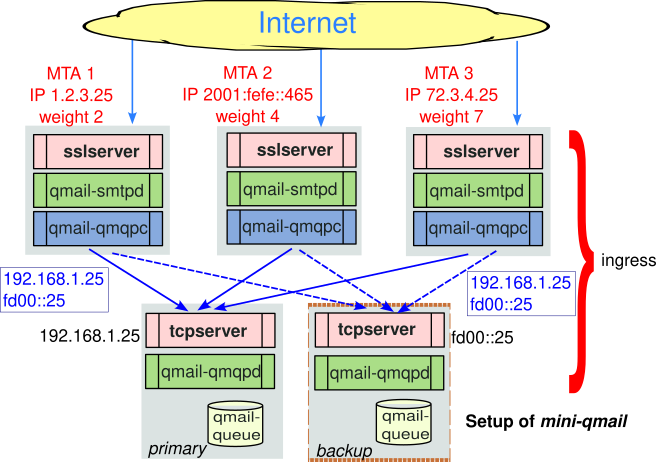
and delivering those to a central but redundant qmail system by means of qmail-qmqpc and qmail-qmqpd
on the receiving system while making use of tcpserver and its feature to control incoming connections via a cdb.
- Typically, some downstream MTAs (like Exchange) are responsible for the email's 'last mile'.
- Alternatively, your MTA acts as an 'mail toaster' providing access to (virtual) mailboxes for the users (while employing Vpopmail or Vmailmanager) and enabling POP3 and/or IMAP4 access while providing SMTP delivery.
10.2.1 Setup of mini-qmail
Setting up a mini-qmail requires the following steps.
- A set of qmail instances need to be raised:
- A full-blown standard qmail instance with all bells-and-whistles.
- A set of 'mini-qmail' instances without a queue but qmail-qmqpc as link to qmail-queue in order to deliver mails to the central system - without queuing but in fail-over mode.
- The 'mini-qmail' instances need to be provissioned with the IP addresses of the downstream main qmail instances in control/qmqpservers. In s/qmail, this could be an IPv6 addresses, and even an IPv6 LLU address given all the nodes are on the same link segment (which is not preferrable).
- The main qmail instance needs to be supplied with qmail-qmqpd
as a daemon process. In order to restrict connections from upstream clients,
tcpserver's cdb has to be configured such to allow connections
soleley from the upstream 'mini-qmail' clients.
It should be noted, that any mail transfer happens un-encrypted. Thus, additional means are required to ensure transport-level confidentiality.
10.2.2 Advantages of mini-qmail
This setup has several advantages and can be expanded to even larger custers:
- The mail system can be now immunized against DoS and DDoS attacks using serveral incoming servers using multiple Internet reachable IP addreses (IPv4/IPv6).
- Given every 'mini-qmail' server has its settings for sslserver and qmail-smtpd some fine-grained access can be achieved. It should be noted, that the qmail-smtpd can use the same DNS cache. The sslserver's cdb can be quickly exchanged among the 'mini-qmail' systems, synchronized by means of scp irrespectively of the hardware the 'mini-qmail's are running on.
- There is no 'queueing' on the upstream 'mini-qmail' systems. Delivery happens, when the (or at least one of the downstream) primary instances is able to process and queue the mail.
- The central qmail instance has a queue which might be shared by serveral 'central' qmail instances using NFS or other distributed file systems like Ceph realizing in fact only one physical storage.
- s/qmail supports this while allowing the queue to reside on a different file system then the executables.
10.3. Idea of Qmail-Multiple-Queues (QMQ)
The idea for QMQ was raised while trying to improve reliable delivery to distinct downstream domains even in the case of general attack to the main receiving system.
One major load any qmail system is the us of an anti-virus scanner. Such a tool usually requires significant system resources and in particular I/O. s/qmail/ provides several means to include such a AV systems; but the principle problem still exists.
While adjusting qmail for the German government, it turned out, that different needs for such AV systems need to be accustomed; in particular what is called 'multi-tenancy'.
QMQ is the approach to provide this for downstream (responsible) domains without inflicting services for others. QMP (Qmail-Multiple-Queues) is thus the opposite of a 'mini-qmail': For one major qmail (receiving) instance, serveral egress instances are raised with individual queues and delivery schemes.
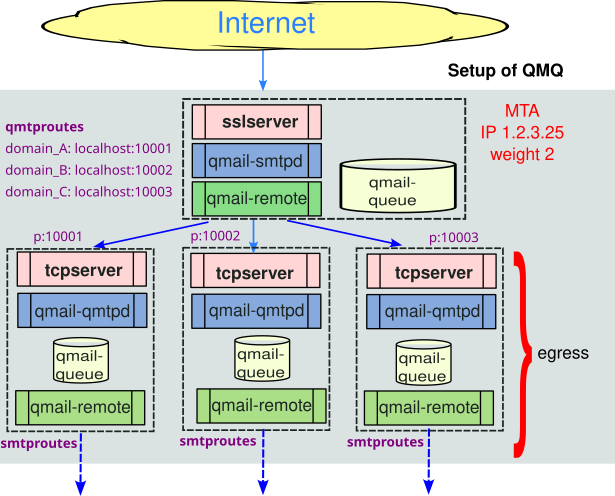
Which advantages can be expected with serveral Queues?
In a QMQ s/qmail system, typically one MTA is setup for several (small) s/qmail instances; however now with several queues for dedicated domains.
Those QMQ instances provide the following features:
- For each downstream domain they provide a 'buffer' for delivery. Thus even, if the downstream recipient MTA is down, the delivery scheme only impacts this instances, while the primary instance got rid of the mail and not trying a (costly) new delivery.
- Domain-specific rules can be applied now:
- Licensed anti-virus scanners
- Particular anti-spam means and thresholds.
- Re-writing of email-headers ... to be removed/added or indicate something.
- Special treatment of MIME attachments in the email body.
- This can be now facilitated without impacting other domains.
10.3.1 Setup of QMQ
Within s/qmail the following means are available to setup distinct queuing:
- s/qmail's install routine has been QMQ enabled allowing an easy setup.
- In the directory scripts you will find multiple-queues.sh to trigger the setup.
- In the s/qmail installation directory a configuration file conf-qmq is situated to be used by multiple-queues.
Once you have made of sketch of your desired delivery scheme, this will potentially include:
- The domains to be treated by a singe QMQ instance. This domain is identified by name in the SMTP envelope and operates its own mail server for local mailboxes. Simply ennumerate those domains.
- You probably what to setup an QMQ instance responsible for spam and other malware to be inspected on demand. Lets give it the number 98.
- It is wise to setup another 'dorming' QMQ instance of backup purpose. Lets call it '99'.
These settings need to be reflected in conf-qmq which provides the initial default dummy settings:
At that point, lets assume, all other s/qmail settings work out. The QMQ setup can be done anytime later!
The next steps are the following:
- Move to the scripts directory and do a make. At that point, all scripts will be provissioned with your given setup.
- Call the generated multi-queue script!
- It will tell you to use the steps build, conf or all. Proceed as required.
Now, the s/qmail installation starts for the given QMQ instances and perhaps populate ('conf') those with a minimal setup.
This does not impact your running system. The QMQ instances are raised
in your given high-level prefix (typically 'var) at conf-qmail
with queues setup at conf-queue (if different).
Futher, the /service might be populated.
All this can be purged or modified on demand.
Though QMQ (along with s/qmail) takes advantage of DJB's supervise, any other tool can be used; though of course requiring additional attention.
Now it is time, to investigate the raised QMQ instances. Those instances are minimalistic, just have the directories and binaries required to serve the domainstream (egress) MTA together with the queue. There are serveral things to check:
- QMQ depends on qmail-qmtpd instead of qmail-qmqpd for mini-qmail. This instances is fed by typically tcpserver and bound to a port at 1000 + instance-id as given in conf-qmq. multi-queue creates appropriate run scripts under /service and the given instance.
- For the instance name, under service another qmail-send (given by instance name) is available.
- All QMQ instances should be touched down initially.
10.3.2 Provisioning Domains in QMQ
While the ingress communication from the Internet is realized by the primary QMQ instance, the outgress delivery is subject of each QMQ instance, making use of the following control files:
- rcpthosts and locals: This needs to match the domain the mails are delivered to, unless virtualdomains is in use to.
- smtproutes to specify the final destination host for the incoming domain mail.
- tlsdestinations: Including potential TLS security considerations for the receiving MTA.
In addition, it is possible to define own SPF and/or DKIM rules for the ingress SMTP data traffic here.
10.3.3 Special and Dorming Domains
Given SPAM and perhaps DoS attacks not matter of general rules or general rules can not be applied due to a local policy, ingress mails - given a certain pattern - can be forwarded to a dorming QMQ instance and now qmail-smtpd or qmail-qmptd is activated. In the above sample it carries the instance number 98.
The dorming domain only receives those mails (by SMTP or QMTP) but does not process the mails in the queue. Thus, the qmail-send service is still sleeping. Thus, the emails are queued and subject of investigation.
The very same setup can be used for honeypots, if required. This obfuscates for any attacker the processing chain, which is important for further forensic analysis.
10.4. Controlling domain-specific Delivery and Email Tapping
For a large organziation, or given a require policy, particular rules may be applied to control email delivery. While DKIM and SPF can be used for ingress SMTP traffic now the focus changes to egress traffic, i.e. the delivery of emails to an downstream domain or MTA.
Further, starting with s/qmail 4.4, it is possible to provide TAPPING for email, thus duplicating those and delivering them to a catch-up receipient.
10.4.1 Controlling
Egress data traffic is subject of qmail-remote. Here we have three major 'knobs' to be used:
- control/authsenders: Making qmail-remote aware of SMTP authentication for a downstream domain.
- control/smtproutes: This a redundant implementation. Here, MX and IP DNS lookup can be avoided while allowing to specify a receiving port.
- control/tlsdestinations: Allowing to command qmail-remote to use a specific TLS encryption and verification policy per receiving host or domain.
However, even emails accepted for local delivery (in our Unix MTA) can be subject of further delivery instructions. Here, we can use:
All these commands are subject to be invoked by a dot-qmail file and scheduled by the qmail-command.
More helpers are available from my mess822x package.
10.4.2 Tapping
s/qmail 4.4 includes an embedded email tapping facility as part of its qmail-queue implementation. However, this needs to be build during compile time while enabling it in conf-cc.
10.4.3 Quotas
Quotas are currently not supported by s/qmail. Thus, the size of the user's mailbox is checked upon delivery. This holds for local as well as virtual domains and users. This may be subject of change in later implementations.